
Asset List Management (Search for, and Select Devices)Updated 9 months ago
Manage Trackers with Ease
This guide details searching, selecting, and managing trackers within the Assets Map.
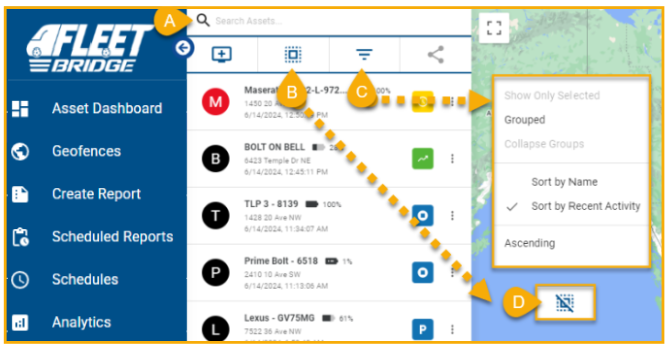
A) Search
- Utilize the search bar to locate assets by name.
B) Filter
- Organize assets by name, recent activity, or group for efficient navigation.
C) Bulk Actions
- Select multiple assets to view on map and perform searches.
D) Deselecting Assets
- Deselect all chosen assets with the "Clear Selected Assets" option. When Assets are selected, the Bulk Action button will automatically change to look like reference D.